Form Help
 
Quote / Order Form Help
user:


Step 1) Unit Style & Layout
  In this section there is a small line drawing and a written description of your shower door. What we are concerned with is that basic layout matches your needs. The size or width of the individual panels is not relevant, but the number of panels and their orientation to the door is critical. On close examination you determine you don't have an exact match return to the Style / Layout page and select the image that matches you shower door. There are three different Style/Layout pages, so you want to make sure you are using the correct page. If you want a steam shower it should specifically say STEAM in the description.
     
Example:        
 

Style 5, Layout B

A swing door with a left inline panel and a right return panel. This layout requires the use of a header to avoid glass to glass contact and possible breakage. The shower uses pivot style self centering hinges which allow the door to swing in or out of the shower.


Step 2) Dimensions
 
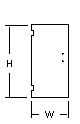
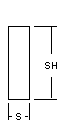
The dimension area is where you specify the size of the space you want the shower door to fill. Please note that the dimensions need to be Centerline Space dimensions. These are the space dimension right where you want the glass to set. If you provide pan dimensions then we will build you a shower door unit that set right on the outside edge of the pan. If you are not sure about measuring the space you can take a look at the "How to Measure" page. We have provided small images of each panel of glass showing where each measurement parameter is applied. Use the note area to specify special conditions such as wall conditions (e.g. Right wall falls out 3/8" ).
Example:
     
          Std. sizes
W=
in. Door: (W)  Door area width at the bottom
28 in.
H=
in. Door: (H)  top of curb to top of unit
72 in.
S=
in. Inline: (S) Width of Inline Panel
?
SH=
in. Inline: (SH) Inline Height
72 in.
Notes:  
 
     
This form requires decimal numbers, so you need to convert your fractions . We manufacture to the 1/16" so there is no need to be any more precise. The table can be used to convert you fractions to decimals.
Example:    
  27 1/4" = 27.25
Fraction
Decimal Value
 
1/16"
.063
1/8"
.125
3/16"
.188
1/4"
.25
5/16"
.313
3/8"
.375
7/16"
.438
1/2"
.5
9/16"
.563
5/8"
.625
11/16"
.688
3/4"
.75
13/16"
.813
7/8"
.875
15/16"
.938
 
 
Step 3) Glass Selection
 

In the Glass Selection section of the this page you get to specify what glass type, what design work, what top edge work, and for the door glass, what seal kit will be used. There is a selection section for each panel of glass. This allows you to specify the glass type, design work, and top edge fabrication work individually. To the right of each pull-down is a image of a magnifying glass. By clicking on this image you will see more detailed information on your selection.

Example:
Door:      
Glass